Infographic 14 · ZANISS SOFTWARES

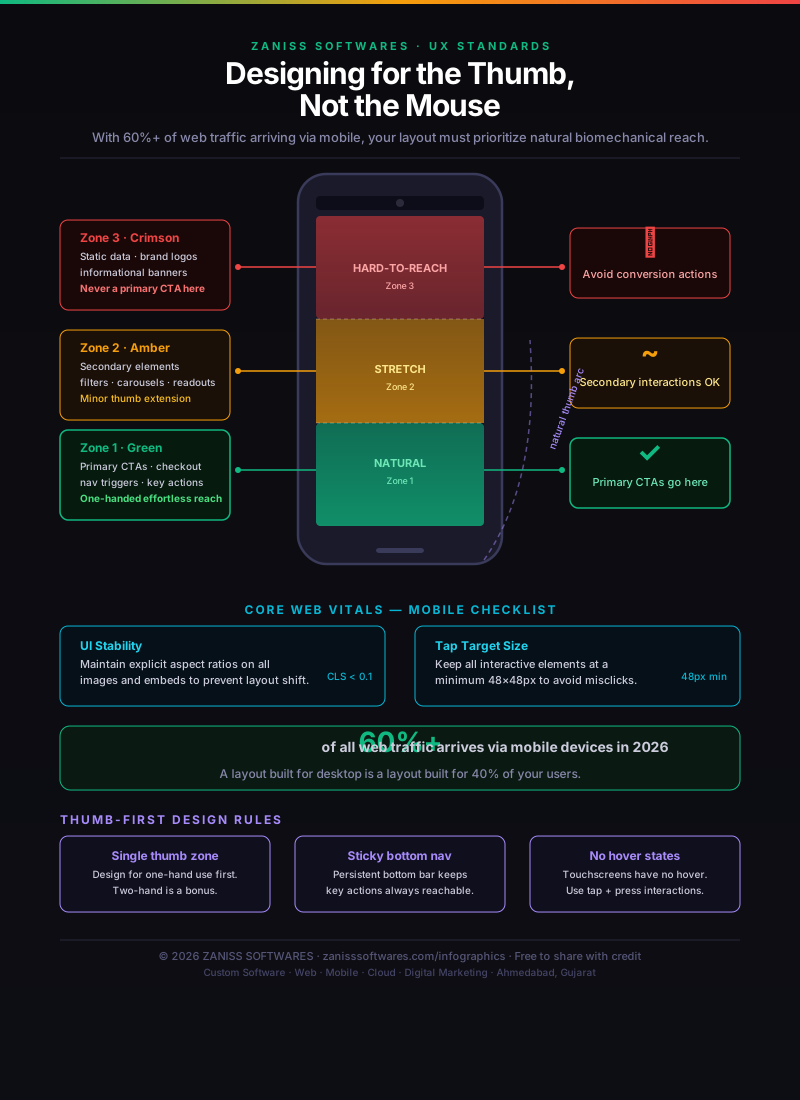
Mobile UX Thumb-Zone Heatmap — 2026 Design Guide

When more than half your visitors are holding their phone in one hand, your layout is either working with their biomechanics or against them. This page maps the three ergonomic thumb zones, pairs them with the Core Web Vitals rules they enforce, and lays out three thumb-first rules every 2026 mobile layout should follow.

Mobile UX Thumb-Zone Heatmap — 2026 Design Guide — infographic by ZANISS SOFTWARES
Mobile UX Thumb-Zone Heatmap — 2026 Design Guide · Source: ZANISS SOFTWARES — free to share with credit and a link back to this page.

Key takeaways

  • Zone 1 (bottom third) — Natural: place primary CTAs, checkout buttons, navigation triggers here
  • Zone 2 (middle third) — Stretch: ideal for filters, carousels, content read-outs
  • Zone 3 (top third) — Hard-to-Reach: restrict to logos, banners, low-priority icons. Never place primary conversion actions here
  • Core Web Vitals CLS target: under 0.1 — maintain explicit aspect ratios on every image and embed
  • Tap target minimum: 48×48px on every interactive element with at least 8px spacing

Why 60% of Traffic Demands a Thumb-First Layout

A checkout button placed in the top-right corner — natural on desktop — requires a full grip shift on mobile, introducing friction at the highest-value moment in the user journey. A navigation menu that opens in the top-left demands the same compromise. The thumb-zone model solves this by mapping your layout to how people actually hold and operate their phones in 2026: a single hand, thumb doing most of the work, index finger occasionally assisting. This is not an edge case or an accessibility consideration. It is the primary use mode for the majority of your mobile visitors. A layout built without this model produces measurably higher bounce rates and lower conversion rates regardless of how good the visual design is.
The Three Zones Explained

The natural zone covers the bottom third of the screen and requires no thumb extension for the average adult hand. Primary actions — buy now, submit, add to cart, open menu, call now — belong here without exception. The stretch zone covers the middle third and requires minor thumb extension that most users perform automatically; it suits supporting interactions like product filters, secondary navigation items or social share buttons. The hard-to-reach zone at the top is accessible but requires a grip adjustment; restrict it to content users rarely interact with — brand headers, progress indicators and settings icons. The key implication: the further up the screen a conversion action is placed, the more friction exists between intent and action.

Core Web Vitals and Three Thumb-First Design Rules for 2026

Layout stability — measured by Cumulative Layout Shift (CLS) — is enforced by setting explicit width and height attributes on every image and embed before the page loads, preventing jumps that frustrate users and that Google uses as a direct ranking signal. Tap target accuracy is maintained by keeping all interactive elements at a minimum of 48×48 CSS pixels with at least 8px spacing between adjacent targets. Three rules for 2026: design for single-hand use first — assume one thumb is doing all the work and verify every primary action is reachable without a grip adjustment; use sticky bottom navigation — the most effective structural change available for improving mobile conversion rates; eliminate hover states — touchscreens have no hover event, so every dropdown, tooltip and hover-triggered CTA must be replaced with tap and press equivalents.

Want this applied to your business?

Book a free consultation and we'll map this framework to your project — no fluff, no sales pressure.