Infographic 15 · ZANISS SOFTWARES

Spreadsheet Chaos vs API Automation — The Operational Cost

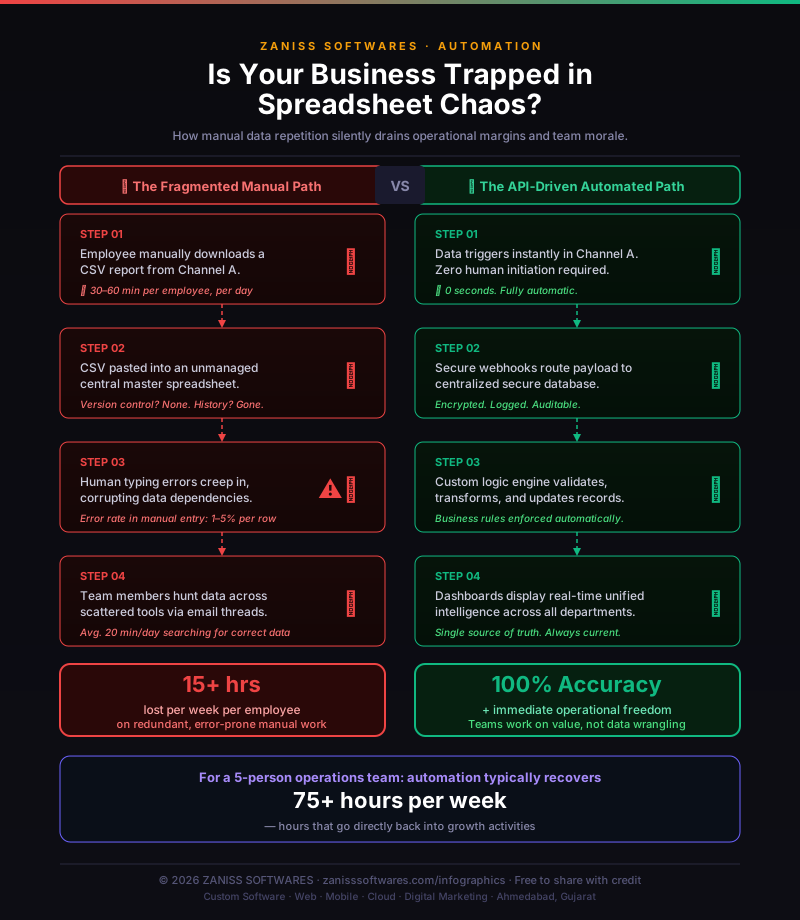
Spreadsheets carry zero licence cost — and that is precisely why their operational cost is invisible. This page quantifies the 15+ hours per week the average ops employee loses to manual data handling, and lays out the four-step API-driven path that eliminates the labour and the error at the source.

Spreadsheet Chaos vs API Automation — The Operational Cost — infographic by ZANISS SOFTWARES
Spreadsheet Chaos vs API Automation — The Operational Cost · Source: ZANISS SOFTWARES — free to share with credit and a link back to this page.

Key takeaways

  • The manual path costs 15+ hours per employee per week on work that generates no revenue
  • Manual data-entry error rate is 1–5% per row — enough to corrupt financial reporting, inventory and customer records at any meaningful volume
  • For a 5-person ops team, automation typically recovers 75+ hours per week that go directly to revenue-generating activities
  • ROI on SME automation is typically achieved within 3–6 months through recovered labour, reduced errors and faster decisions
  • If your team has weekly meetings whose primary purpose is determining which version of a number is correct, those meetings are a symptom of a solvable automation problem

The Hidden Cost of 'Free' Spreadsheets

When you account for the time spent downloading, formatting, copy-pasting, reconciling errors and answering 'which version is correct?' emails, the real cost per employee typically runs to 15–20 hours per week. Across a team of five, that is 75–100 hours per week that could be spent on customer-facing or revenue-generating work. The calculation compounds when you factor in error correction. A 2% error rate on 10,000 manual entries per month produces 200 incorrect records. Each requires identification — often by accident when a decision based on bad data produces a bad outcome — investigation, correction in multiple systems and communication to affected teams. The cost of each corrected error is multiples of the cost of the original entry.
The 4-Step Manual Drain in Detail

Step one: an employee downloads a CSV report from Channel A — 30 to 60 minutes per day. Step two: that CSV is manually pasted into an unmanaged master spreadsheet — version history nonexistent, formula dependencies fragile, audit trail absent. Step three: typing errors corrupt dependent calculations and financial models — the average human data entry error rate is 1–5% per row. Step four: team members spend an average of 20 minutes per day searching across email, chat and multiple spreadsheet versions for the correct current figure before making any data-dependent decision. Multiply those four steps across your headcount and the annual labour cost becomes the most expensive line item nobody is tracking.

The 4-Step Automated Path

Step one: data triggers the moment an event occurs in Channel A — zero human initiation, zero delay. Step two: a secure webhook routes the payload to a centralised, encrypted and fully auditable database. Step three: a custom business logic engine validates the data against your rules, transforms it into the correct format, flags exceptions for human review and writes it error-free. Step four: a real-time unified dashboard surfaces the correct figures to every department simultaneously. No emails. No version conflicts. No data hunts. No reconciliation meetings. The strongest candidates for automation are workflows involving regular data movement between two or more systems: order management, inventory updates, CRM-to-accounting sync, HR onboarding and reporting aggregation. If a human is downloading a file and pasting it somewhere else more than twice per week, that workflow should be automated.

Want this applied to your business?

Book a free consultation and we'll map this framework to your project — no fluff, no sales pressure.