Quick Summary
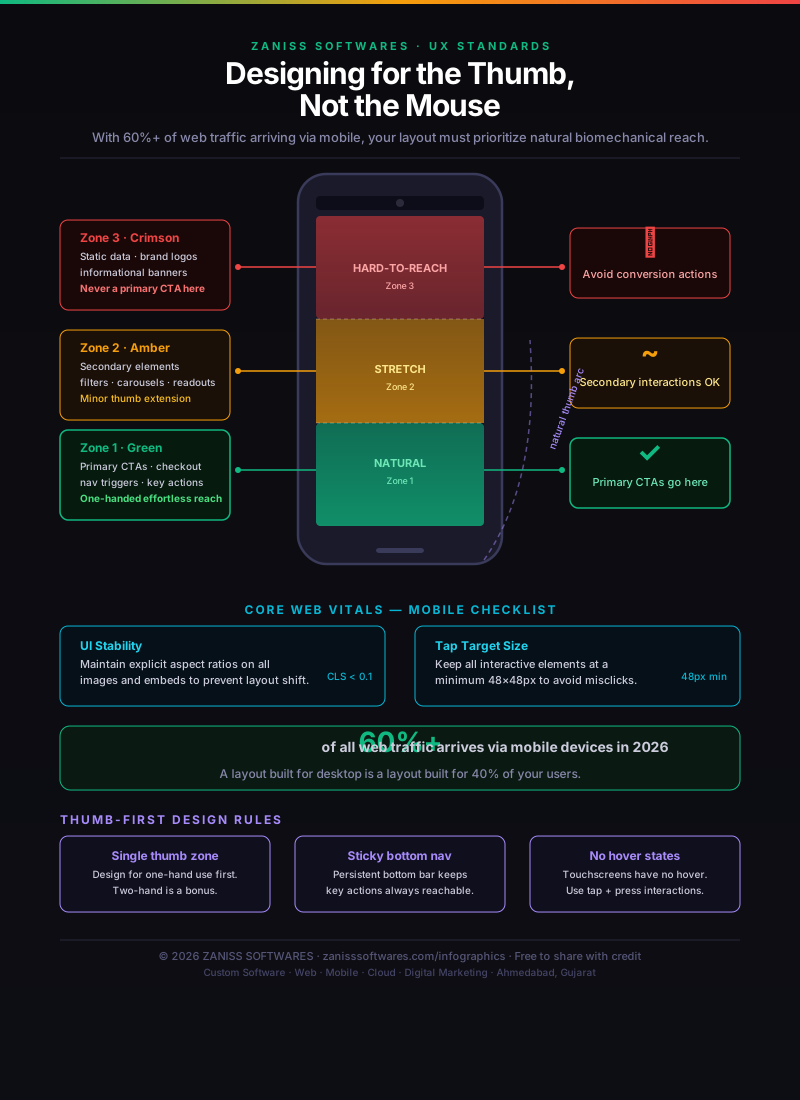
- 1Bottom 60% of the screen = thumb's natural reach — put primary CTAs here.
- 2Top corners = grip-shift zone — never place primary actions there.
- 3Bottom navigation outperforms top hamburger menus on mobile conversion.
- 4Test by handing your phone to someone and watching what their other hand does.
Why thumb zones change everything about mobile UI
When Steven Hoober published his original thumb-zone research in 2011, the average phone screen was 3.5 inches. In 2026, most Android phones have screens between 6.0 and 6.7 inches, and the proportion of Indian users accessing the web on mobile exceeds 75%. The mismatch between these large screens and the natural arc of the human thumb is one of the most underweighted UX problems in Indian app and mobile web design.
The core insight from thumb-zone research: when holding a phone in one hand, the natural comfortable reach covers roughly the bottom two-thirds of the screen, with the sweet spot in the lower centre and lower right (for right-handed users). The top of the screen — where most navigation bars historically lived — requires an awkward grip shift or a second hand. The implication for mobile design is significant: every critical action should be reachable without grip adjustment.
Planning a Website? Don't Overpay or Underbuild
Most businesses overspend on features they don't need — or underspend and rebuild within a year. We help you scope it right from day one.
The three zones
Green (easy reach): The lower 60% of the screen, from the bottom edge up to roughly the middle. This is where thumbs rest naturally when holding the phone. Primary CTAs, key navigation items, and high-frequency actions should live here. Bottom navigation bars (which replaced top navigation bars in most major apps by 2022) are here for this reason.
Yellow (stretch zone): The upper sides and middle band. Reachable with a small thumb extension, acceptable for secondary actions and lower-frequency controls. Content and scroll interactions are fine here — the problem is interactive elements that require precision under stretch.
Red (danger zone): The top of the screen, especially the top corners. Reaching here requires either shifting grip or using a second hand. Top-left menu icons are still common despite being the worst possible placement for the most-used control in many apps. Reserve this area for content only, never primary actions.
What this means for common UI patterns in 2026
Navigation: Move primary navigation to the bottom of the screen. Tab bars with 3–5 top-level destinations are the correct pattern for one-handed mobile use. If you still have a hamburger menu in the top left, it's costing you engagement.
Primary CTA buttons: Place at the bottom of the screen, full-width or near-full-width. "Buy now," "Book now," "Get a quote" — these should never require grip adjustment to tap.
Forms: Inputs in the middle of the screen are acceptable. Submit buttons must be at the bottom, with the keyboard's confirm button reinforcing the action.
Back navigation: Android users have system back gestures; iOS users swipe from the left edge. Top-left back arrows are redundant on most platforms and should be replaced with a clear header that communicates context, not a tappable back button.
Testing for thumb comfort in your own product
The simplest test is to hand your phone to someone, open your app or mobile site, and watch what they do with their other hand. If they use it to stabilise, support, or tap items on the top of the screen, you have a thumb-zone problem. Formal usability testing services can provide eye-tracking and tap-heatmap data for more rigorous validation. We bundle thumb-zone audits into our mobile app development and UI/UX design engagements.
Need a mobile UX audit or a redesign with thumb-zone principles applied? contact us for a free consultation.
Pro Insight
Planning a cloud-native platform? Let's review your architecture for free.
At ZANISS SOFTWARES, we don't just build websites — we build growth systems.
- ✓SEO-first architecture
- ✓Conversion-focused design
- ✓High-speed performance
- ✓Scalable, future-proof code
📩 Response within 24 hours
Frequently Asked Questions
Does thumb-zone design also apply to tablets?
Partially. Tablets are usually held with two hands, so the constraint relaxes — but bottom-anchored primary actions still test better than top-anchored ones.
What about left-handed users?
The natural arc mirrors. Designing for the centre-bottom (rather than bottom-right) keeps the layout comfortable for both hands.
Should every CTA be at the bottom?
Every primary CTA, yes. Secondary actions can live higher up — the rule is reachability scales with frequency of use.