Quick Summary
- 1Scope documents fail when they're features lists, not behavioural specifications.
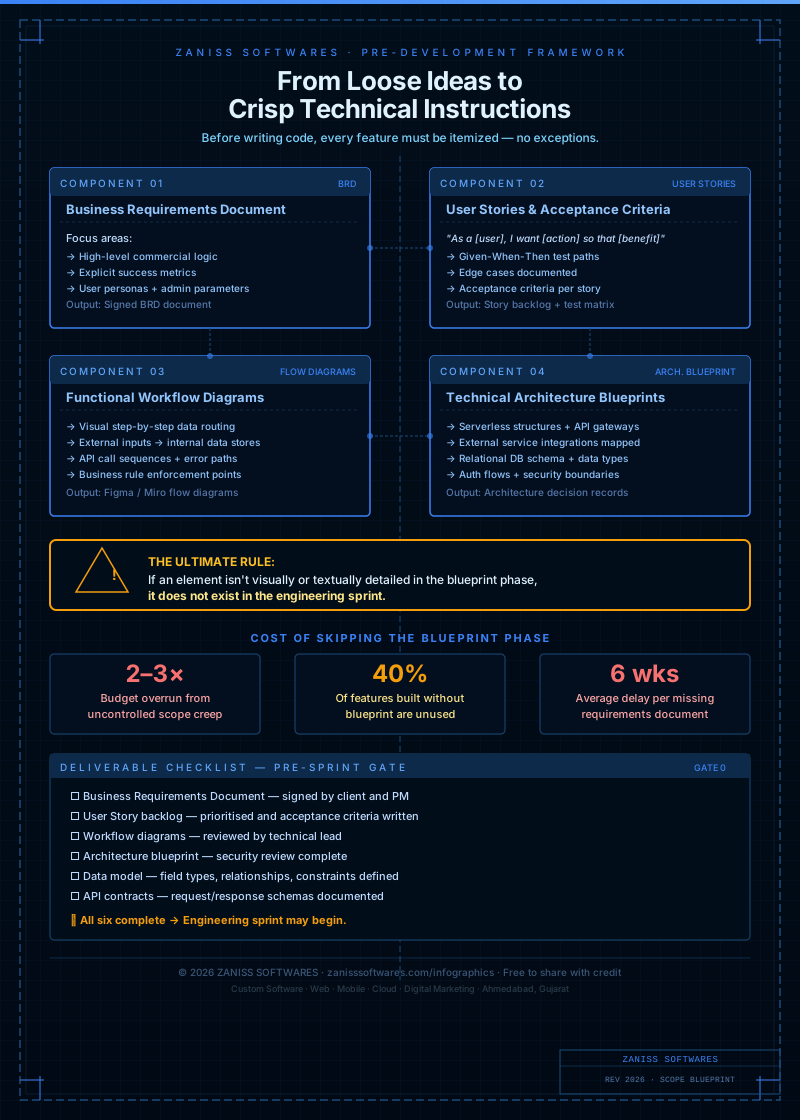
- 2The 25-item blueprint covers users, workflows, integrations, infrastructure, exclusions and acceptance.
- 3Explicit scope exclusions matter as much as inclusions — they're what prevent mid-project additions.
- 4Vendors who refuse to fill in a scope checklist are vendors who'll charge you to figure it out later.
Why scope documents fail (and what to do instead)
Most "scope documents" are too vague to be useful. They say "user management" without specifying: how many user roles, what permissions each role has, whether there's SSO, whether users can be invited or only self-register, and whether deactivated users retain their data. A developer reads "user management" and builds one thing; the client expected another. The discrepancy surfaces at demo time, with both parties technically correct and neither happy.
A scope blueprint isn't a list of features — it's a complete behavioural specification of what the system does, for whom, under what conditions, and with what outputs. It's the document that both parties sign before a development sprint starts, and the document that resolves every "but I thought we said..." conversation.
Planning a Website? Don't Overpay or Underbuild
Most businesses overspend on features they don't need — or underspend and rebuild within a year. We help you scope it right from day one.
The 25-item scope blueprint checklist
User and access layer
- List of all user types/roles in the system
- Permissions matrix: what each role can read, create, edit, delete
- Authentication method: email/password, SSO, Google, phone OTP
- Session duration and security requirements
- User invitation flow: self-register, invite-only, or admin-created
Core workflow definition
- Primary user journey mapped end-to-end (step by step)
- Secondary user journeys (at least 3 key ones)
- All forms: every field, field type, validation rule, required vs optional
- All notifications: trigger, channel (email/SMS/push/WhatsApp), content
- All file uploads: allowed types, size limits, storage location
Integration and data
- All third-party integrations: what data flows in, what flows out
- Payment gateway: which one, currencies, refund logic
- Data import: what formats, what validations, what happens on errors
- Data export: what formats, who can export, audit log required
- Reporting: which reports, which users can see them, export options
Technical and infrastructure
- Hosting environment and region (data residency requirements)
- Uptime SLA required
- Expected peak concurrent users
- Mobile requirement: responsive web, PWA, or native app
- Accessibility standard required (WCAG 2.1 AA or similar)
Scope exclusions (what is not being built)
- Explicit list of features intentionally excluded from this phase
- Integrations explicitly deferred to a later phase
- User types or workflows explicitly out of scope
Acceptance criteria
- Definition of "done" for each major feature area
- UAT process: who signs off, how long, what constitutes a bug vs a change request
How to use this checklist in your next engagement
Send this checklist to any vendor you're evaluating and ask them to complete it based on their understanding of your project. The quality and specificity of their answers tells you more about how this engagement will go than any reference call. A vendor who fills it in carefully is a vendor who will build what you expected. A vendor who waves it away as "we'll figure it out as we go" is a vendor who will charge you for figuring it out. We run this exact discovery as part of every custom software development engagement.
Want us to run a scoped discovery sprint based on this framework? contact us for a free consultation.
Pro Insight
Planning a cloud-native platform? Let's review your architecture for free.
At ZANISS SOFTWARES, we don't just build websites — we build growth systems.
- ✓SEO-first architecture
- ✓Conversion-focused design
- ✓High-speed performance
- ✓Scalable, future-proof code
📩 Response within 24 hours
Frequently Asked Questions
How long does a discovery sprint take using this checklist?
Two weeks for a typical SMB build, three to four weeks for enterprise systems with multiple stakeholder groups. The output is a signed scope, a fixed price, and a delivery timeline.
What if requirements change after the scope is signed?
They will, and that's normal. The signed scope is the baseline; new requirements go through a written change request with their own estimate and approval before work begins. This is how scope creep stops being invisible.
Can we use this checklist with a different vendor?
Absolutely. The framework is vendor-agnostic — its job is to make any vendor's quote comparable to any other vendor's quote on the same basis.